
ONLINE GAMING PLATFORM, 2026
V3 Game Login and Register Get Bonus 500 2026
V3 Game is an online gaming platform where you can create your account, log in, explore different games, and check available rewards and promotions.
Invite Code
9409526420
Promotions change over time. Check the current offer and its eligibility inside the platform before you sign up.
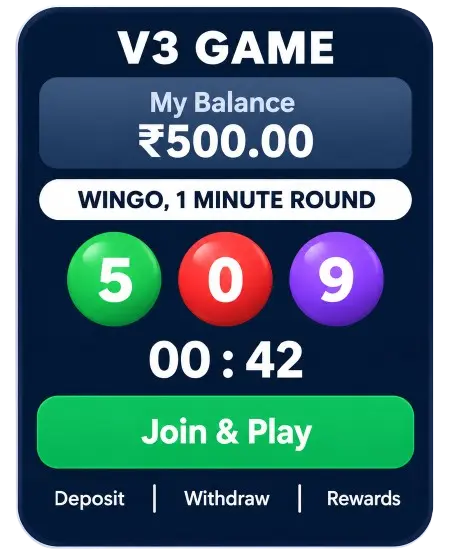
Mobile + Desktop
Play anywhere
Rewards
Bonus, gift codes, cashback
Wallet
Deposits & withdrawals
Dashboard
Balance & history
What is the V3 Game?
V3 Game is an online gaming lottery site offering chances online for mobile and desktop gamers. It offers a variety of games, along with account management, rewards, promotions, deposits, and withdrawals.
After creating an account, you can get access to a personal dashboard. The account area will contain game categories, account balance, transactio history, rewards and promotions, and payment options, depending on the offers and platform version.
Promotions change over time. Check the current offer and its eligibility requirements inside the platform instead of assuming a specific bonus amount is guaranteed.
Rewards the platform promotes
How to Register and Log In
Creating an account takes only a few steps. The registration flow asks for a mobile number, password, verification details, and an optional referral or invite code.
How to Register
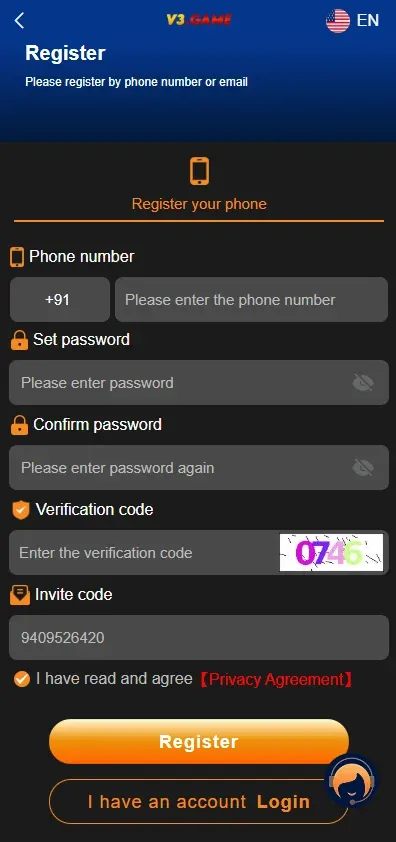
1
Open the Registration Page
Visit the V3 Game registration page and select Register or Sign Up.
2
Enter Your Mobile Number
Use a number you control, since verification or recovery might rely on it.
3
Create Your Password
Choose a strong password, not the one you use for email or banking.
4
Confirm Your Password
Enter the same password again and check both entries.
5
Complete Phone Verification
Enter the OTP received on your phone. Never share an OTP with anyone.
6
Enter an Invite Code
Add a valid invite or referral code and check its conditions.
7
Accept the Terms
Read the Terms and Privacy Policy, then tick the acceptance box if you agree.
8
Tap Register
Review your details, press Register or Submit, then go to the login page.
How to Log In
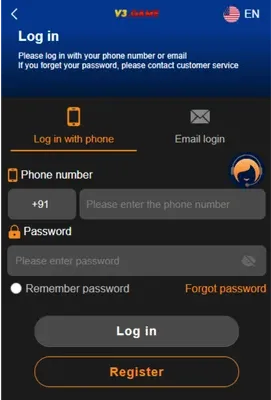
1
Open the Login Page
Go to the V3 Game website and select Login or Sign In.
2
Enter Your Registered Number
Type the mobile number, username, or user ID linked to your account.
3
Enter Your Password
Type the password created during registration.
4
Verify Your Details
Check your number and password for typing errors before submitting.
5
Complete Verification
Enter an OTP if the platform requests additional verification.
6
Tap Login
Press Login. Successful authentication takes you to your dashboard.
Forgot your password? Use the Forgot Password option and follow the available SMS or account recovery process.
Key Features of V3 Game
A mobile-optimized web platform with games, account functionality, promotions and reward-related features.
Variety of Games
Access various games on the same platform, find different categories, and switch between games easily.
User-Centric Design
Registration, login, games, wallet information, rewards, and account settings are easy to reach, with a mobile-friendly layout for phone browsers.
Reward System
Sign-up offers, referral bonuses, daily bonuses, deposit offers, gift codes, cashback, and event-based bonuses. Check the terms before depositing money.
New Content and Regular Updates
Games, offers, payment methods and promotions change over time. Refer to the current dashboard and announcements instead of old promotional information.
Accessible Anytime, Anywhere
A mobile-friendly interface with browser access, so the service can be used through phones and computers without downloading anything.
Personal Dashboard
Game categories, account balance, transaction history, rewards, promotions, and payment options in one account area.
V3 Game Invite Code
An invite code connects your new V3 Game account with an available referral offer. Enter the code during registration if the invite code field appears.
Invite Code
9409526420
App Name
V3 Game
Code Type
Referral / Invite Code
Where to Use
V3 Game Registration Page
Cost
Free
Availability
Subject to current promotion
How to Use
Enter it in the Invite Code field while creating your account
Referral rewards and bonus conditions can change, so check the current offer displayed on the registration page before completing signup.
V3 Game Gift Code
Gift codes are promotional codes linked to selected rewards or campaigns. Sign in, open the Gift Code, Promo Code, or Rewards section, enter a valid current code, then select Redeem or Claim. Check its expiry and eligibility requirements first.
Before redeeming, check:
1. Code spelling
2. Expiry date
3. Account eligibility
4. Usage limits
5. Promotion conditions
6. Reward requirements
Stay safe: Avoid websites asking for your password, OTP, PIN, or sensitive payment details in exchange for a gift code.
Deposit and Withdraw Money
How to Deposit Money
Add funds to your V3 Game wallet before joining paid games or online lottery games.
Log in to your V3 Game account.
Open the Deposit or Wallet section.
Choose one of the available payment options.
Enter your deposit amount.
Check the payment details carefully.
Complete the payment using the instructions shown on screen.
Check your wallet balance after the transaction.
How to Withdraw Money
If your account has an eligible withdrawable balance or lottery rewards, submit a withdrawal request from your wallet.
Sign in to your account.
Open the Withdraw section.
Select an available withdrawal option.
Enter your withdrawal amount.
Add or select your payment details.
Check the information before submitting.
Complete verification if requested.
Submit your withdrawal request.
Track its status from your account.
Tips for Maximizing Your V3 Game Experience
01
Explore All Categories
Check different game categories, read the rules, and understand how each game works before playing.
02
Set Personal Goals
Decide your time and spending limits before you start. Avoid spending more money than your planned budget.
03
Participate in Special Events
Check current events, gift codes, daily rewards, and promotional offers. Read the eligibility requirements before joining.
04
Invite Friends to Join
Share your invite code or referral link when a referral program is active. Check the latest reward conditions before inviting friends.
Conclusion
V3 Game brings games, account management, promotions, invite codes, gift codes, and payment-related features into one platform. Registration starts with a mobile number and password, while returning users access their accounts through the login page. Check current bonus terms before joining because promotional amounts and eligibility change. Keep your password and OTP private, review the rules before depositing money, and treat real-money gaming as entertainment rather than guaranteed income.
Frequently Asked Questions
Create Your V3 Game Account
Register with your mobile number, add the invite code, and check the current rewards and promotions inside your dashboard.